
Select where you want to go on this page
Overview
This website looks at assistive technology products for people who have difficulty with their memory and thinking after brain injury. This includes:
- remembering to do day-to-day tasks
- planning things for yourself
- organising things
- getting started with activities in your day-to-day life
- completing activities in your day-to-day life.
Assistive technology that can be used by people after brain injury
The image below is from a paper that looked at assistive technology that can be used by people after brain injury. You can find out more about the paper here.
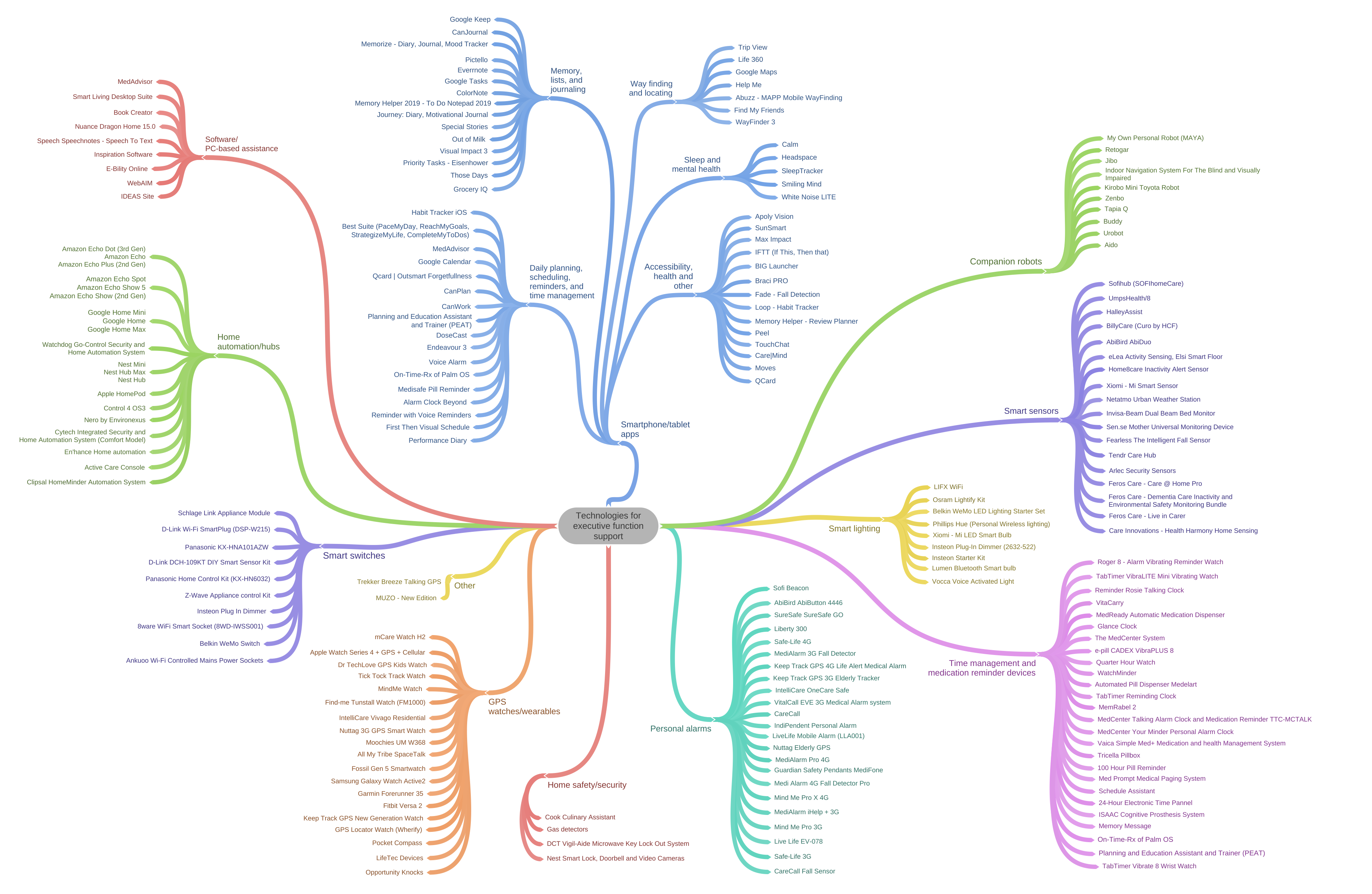
We have created a checklist to help you work out what assistive technology you are currently using.
You can download the checklist below to find out more:
There are a lot of assistive technology you could use:
- at home
- when you are in the community
- where you work
- where you learn or study.
You could talk to an assistive technology advisor to help you find assistive technology to support your goals.
An assistive technology advisor could be an:
- occupational therapist - they can help you find ways to do everyday tasks
- physiotherapist - they can help you with ways to move your body
- speech pathologist - they can help you with how you talk, communicate and swallow
- psychologist - they can help you with the way you think and feel about things
- rehabilitation engineer – they use technology to create things that help you with your disability.
An assistive technology advisor can also help you:
- work out what assistive technology you need
- find what assistive technology you need
- do the paperwork your funding organisation needs, including reports and quotes
- set up your assistive technology
- learn how to use it safely.
Funding is money from the government that pays for supports and services.
Types of assistive technology
You can find out more about different assistive technology by selecting from the different options below.
The information can help you work out:
- what supports they provide
- how they can help you.
Scroll and choose
Software for your device
There is assistive technology software you can use on a device.
Software is what makes a device do useful things.
A device is a computer, a laptop, a tablet, a mobile phone.
You can download and install the software on a device.
Download and install means you choose something online to save to a device.
Online means when you use:
- the internet
- apps on a tablet or a mobile phone.
Examples of assistive technology software are:
- Speech to text.
This can help you communicate more easily. Your device can learn how you talk, and type what you say.
- Medadvisor.
This can help you use medication safely. You can see a list of all your prescription medications.
A prescription is the note your doctor writes so you can get the medicine you need.
If you want, Medadvisor can tell you when you need to take your medications.
Medadvisor will tell you when you are running out of your medicine and need to see your doctor for a repeat prescription.
A repeat prescription is where you need the same medication over time.
You can sometimes get a repeat prescription without having to see your doctor.
You can use Medadvisor to ask for a repeat prescription.
Apps for a tablet or a mobile phone
There are assistive technology apps you can download and install on a tablet or a mobile phone.
Download and install means you choose an app online to save to a tablet or a mobile phone.
There are assistive technology apps to help:
- keep you healthy
- remind you to do things
- plan things for yourself
- organise things for yourself
- get started and complete activities in your day-to-day life.
Smart home hubs
Smart home hubs are assistive technology to help control the environment around you. For example:
- open windows and doors
- open or close curtains or blinds
- turn on or off appliances in your home, like a TV, lamps, fan, air conditioner.
You can control the environment from anywhere using:
- a device
- the internet.
A device is a computer, a laptop, a tablet, a mobile phone.
Smart Switches
A smart switch is assistive technology to help you use and control appliances in your home. For example:
- TV
- kettle
- lamps
- fan.
You can turn the smart switch on and off from anywhere using:
- a device
- the internet.
A device is a computer, a laptop, a tablet or a mobile phone.
You can also set a day and time when the smart switch is turned on or off.
Smart lighting
Smart lighting is an assistive technology product that connects to wifi in your home.
Wifi is a way to connect to the internet.
You can use smart lighting to:
- choose the colour of the bulb
- set a light to turn on or off at any time
- turn a light on or off using a device.
A device is a computer, a laptop, a tablet or a mobile phone.
You can use smart lighting to help you:
- remember to do day-to-day tasks
- be independent.
Select here to read how smart lighting is helping Sam to be independent.
Smart sensors
Smart sensors are assistive technology you can use in your home to:
- keep you safe
- tell someone if you are unwell or had a fall
- help you do more things on your own
- develop skills.
The sensors can be put anywhere in your home. This includes on:
- doors
- drawers and cupboards
- beds
- furniture, like chairs and sofa.
The sensors can collect information about how you live in your home. For example when you:
- go to bed
- get out of bed
- take medication
- have a fall.
Smart sensors can be used to:
- talk to you
- send a message to someone in your support network.
Support network means people you know and trust who can help you. For example:
- family member or other key supporters
- friend.
Select here to read how Josh is using a smart sensor.
Select here to read how John is using a smart sensor with another type of assistive technology.
Select here to read how Katie is using a smart sensor with another type of assistive technology.
Select here to read how Imani is using a smart sensor with another type of assistive technology.
Josh, John, Katie and Imani found the assistive technology helped them to:
- do more things on their own
- develop their skills.
Select here to read Chris’ story about using a smart sensor.
Select here to read Michelle’s story about using a smart sensor.
Chris and Michelle did not think using a smart sensor:
- met their needs
- was the right support for them.
Wearables
Wearables are assistive technology that you can wear on your body, like a smart watch.
Wearables can:
- keep you healthy
- remind you to do things
- plan things for yourself
- organise things for yourself
- get started and complete activities in your day-to-day life.
Some wearables include GPS trackers which can:
- help you find places in the community
- keep you safe.
Home Safety
Home Safety is assistive technology to help keep you safe at home. For example:
- when you are cooking
- from appliances in your home
- when someone comes to your door.
Examples of Home Safety assistive technology are:
- gas detectors
- alarms
- security cameras
- locks for your door.
Personal alarms
Personal alarms are assistive technology that can:
- keep you safe
- support you to be independent - so you can do things for yourself.
You can use personal alarms:
- at home
- when you are in the community
- where you work
- where you learn or study.
The personal alarm has a button you can press if you need help. For example if you:
- have a fall
- feel unwell.
A message can be sent to someone in your support network using:
- an automatic call
- a text message.
Support network means people you know and trust who can help you. For example:
- a family member or other key supporters
- friend.
In an emergency you can also get help from emergency services.
Reminder timers and clocks
Reminder timers and clocks are assistive technology to help you remember to do day-to-day tasks. For example:
- to take your medication
- to go to an appointment.
Reminder timers and clocks can help you remember a task at any time:
- in the morning
- in the afternoon
- overnight.
Reminder timers and clocks can help you remember a task using:
- a voice message
- an alarm which plays a sound, or vibrates.